
The App Store is getting crowded fast. Since late 2025 (thanks Claude), the number of new apps each month is growing sharply.
Go type any app idea into the App Store and start scrolling. You'll see app after app doing the same thing.
And now that you can build an app in a weekend with Codex/Claude Code, there are lot more people competing for the same users.
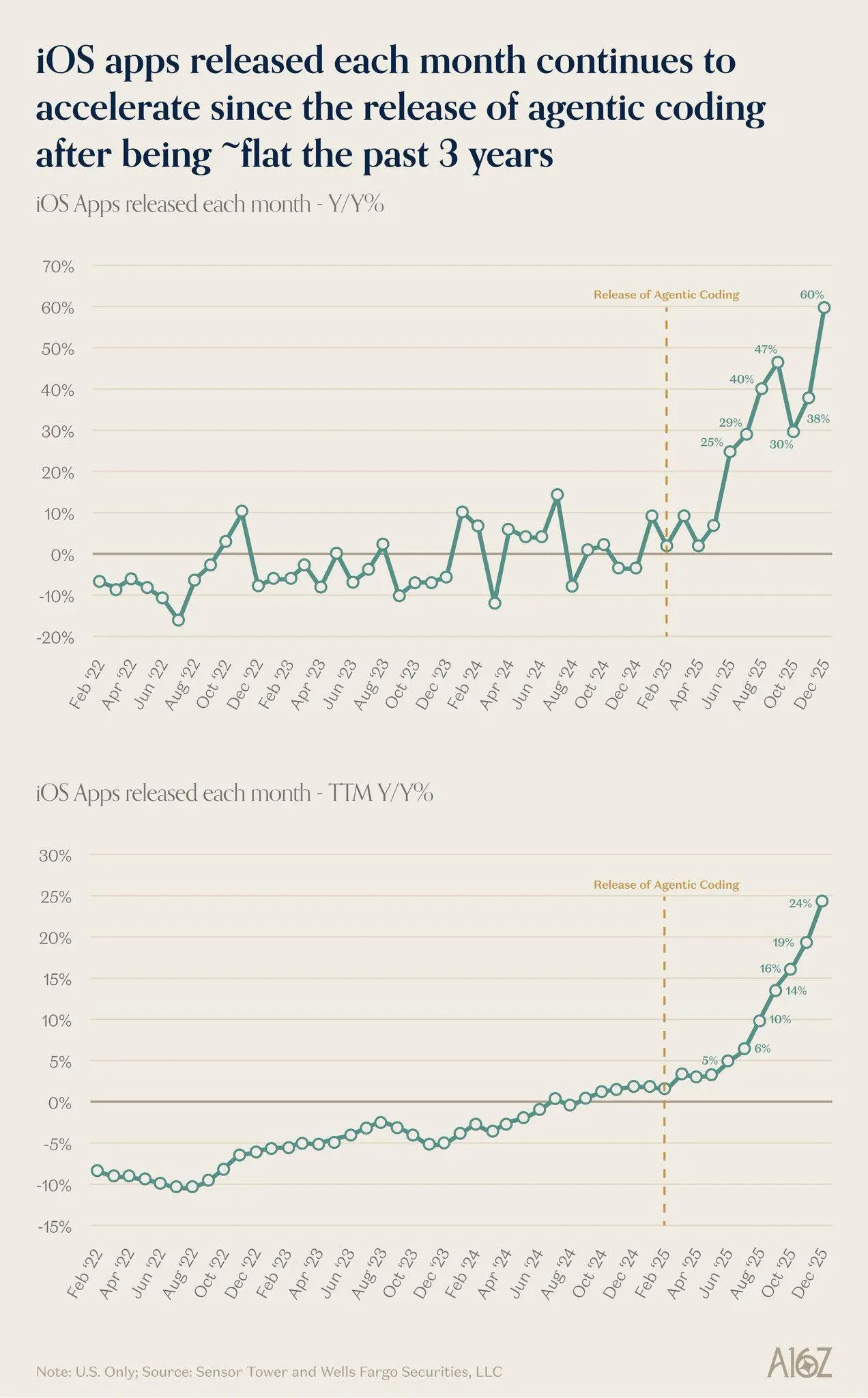
US iOS app releases. Sources shown in the chart: Sensor Tower and Wells Fargo Securities.
But you can also use these tools to give your apps a better chance of getting discovered and making money.
You can research a niche before spending weeks building something nobody searches for. Find keywords where you actually have a shot at ranking. And target users across 30+ languages while everyone else fights over the same US searches.
That's what I've been doing.
I started building apps around August 2025. Since then, I've become obsessed with ASO. I've consumed hours and hours of content, read articles, and run experiments of my own. I built most of my apps around keywords, using the process below.
The annoying part used to be the research. Hours of clicking through competitors, comparing keywords, and trying to find something worth going after.
Now, I can do this in minutes with my friend Codex and 2 other tools (more on that later), across 30+ languages.
So if you've been launching apps that barely get any downloads, this is for you.
I'll break down my entire workflow, with the prompts I use to automate it. The goal is pretty simple: get your apps in front of more people who are already searching for what you've built, and turn more of those searches into installs and $$.
Let's get into it.
The manual process, briefly
Your AI will do most of this later, but you should understand what's happening. It makes it much easier to spot bad suggestions and guide it when it goes down the wrong path.
Here's the checklist:
- Create a temporary app in Astro.
- Start with a basic keyword.
- Inspect the apps ranking for it and explore their keywords.
- Filter for popularity above 20 and difficulty below 50.
- Save relevant keywords and repeat.
- Check the top 10 results for your strongest candidates.
- Look for newer apps, fewer ratings, and weaker keyword targeting.
- Check whether there's evidence that people pay for these apps.
- Build an MVP in about a week.
- Prepare the App Store listing and launch.
These filters are a starting point. A keyword passing them doesn't automatically make it a good opportunity.
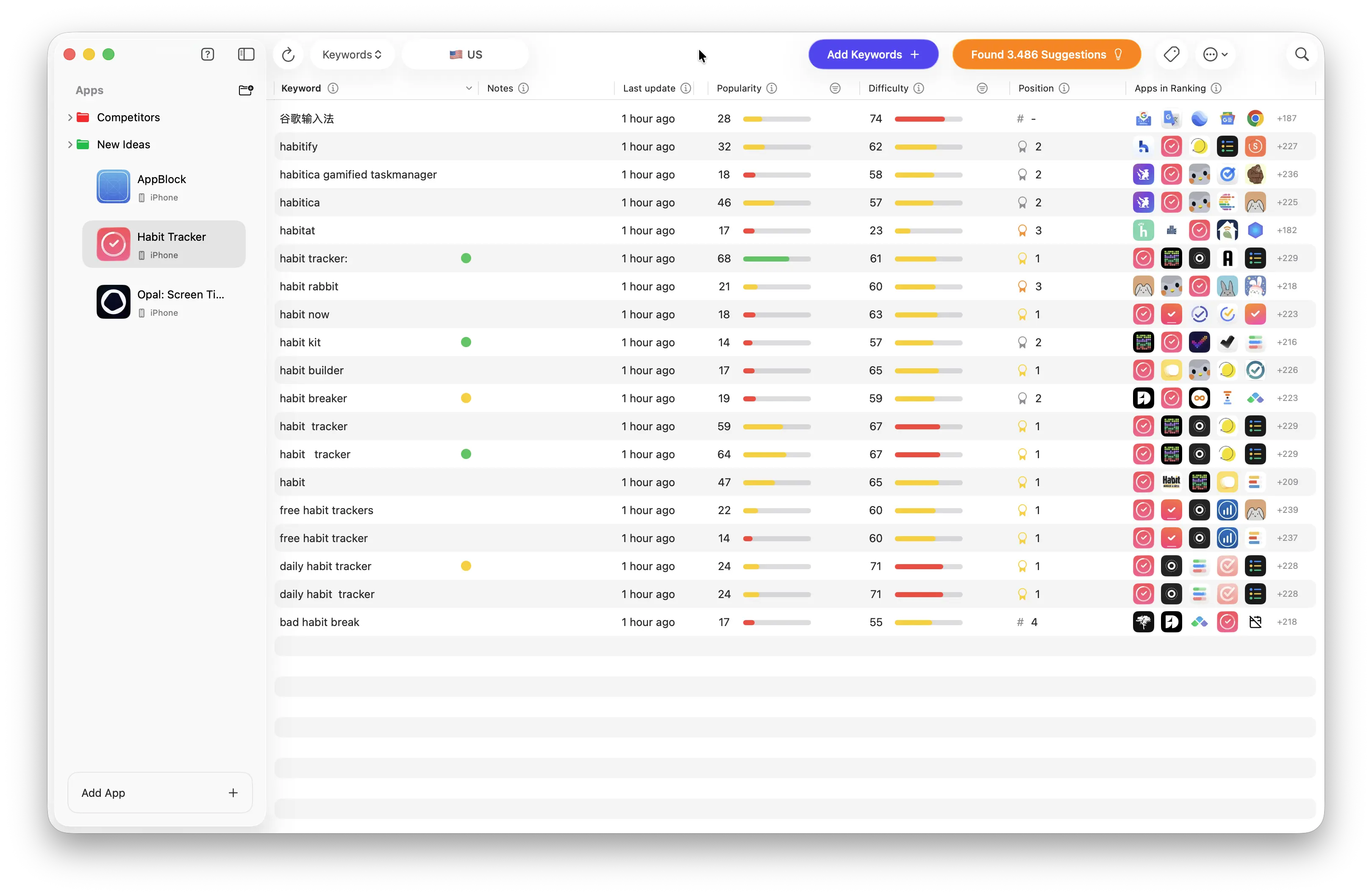
Keyword research in Astro
I went through the full process with an example and screenshots in my App Store keyword research guide. Read that first if you're new to this. Here, we'll focus on automating it.
The tools you need
Codex or Claude Code
You can't go wrong with either. You probably already have a subscription, so use that!
We'll use it to research keywords through Astro, turn that research into localized metadata, and upload everything to App Store Connect.
Astro + Astro MCP
Astro is the main tool I use for keyword research. It has all the data I need, and it's cheap enough to use before an app is making money.
Its MCP server is the secret sauce of this whole strategy. It lets your AI work with Astro directly, so you can ask it to inspect competitors, find keywords, and organize the results.

Astro MCP server
I used to do this manually. Finding a niche and some decent keywords could take hours. Being able to hand that work to AI makes it much easier to research multiple ideas and markets.
There are other tools, like Appfigures and AppTweak. Some have more features, but we don't need a stack of expensive subscriptions for this. I compare them in my ASO tools guide.
Different tools calculate their scores differently anyway. Pick one, learn how to read its data, and check the actual search results. Otherwise, you'll overthink it and never find that perfect keyword you're looking for.
For this workflow, I'm sticking with Astro.
ASC CLI
ASC CLI is how I push the finished metadata to App Store Connect.
If you've ever manually updated the same fields across dozens of languages, you already know why I don't wanna do that again.
Automate the keyword research
That walkthrough sounds pretty boring, right? Well, you can automate all of it. And you can do that for all 50+ languages the App Store supports.
Since US keywords are extremely competitive, you might realize that it's better to rank #1 across 10 other locales and make decent money, instead of chasing the US like everyone else.
Here is the first prompt I send in this process. Paste this into Codex/Claude Code:
I want to build a {niche} app. Use the Astro MCP to find a list of keywords that fit the following criteria: Popularity >20, Difficulty <60. If you’re unable to find any, look for sub niches and long-tail keywords. As a last resort, look for any keywords outside the given range of popularity/difficulty.

First, create a temporary app inside Astro, to group all of the keywords. Start by checking out existing high-ranking apps in {niche} and extract the keywords that they rank for.

Do NOT stop until you found a list of suitable keywords.

The Astro MCP is available at: http://127.0.0.1:8089/mcp

Come back with the full list of keywords, printed out in the chat in a table format, with keyword/popularity/difficulty columns.

Also, write them down an en-keywords.md file in the current directory.
Iterate based on the results. Ask it to go deeper into a promising keyword or inspect a few competitors more closely.
If nothing looks good, try a different niche. You don't need to convince yourself that your first idea was the right one. Finding that out before you build is already a win.
Instead, spend an hour or two doing this, and I'm convinced you will find some good keywords.
Find keywords in other markets
Think about how many devs are opening an ASO tool right now and researching the exact same English keywords as you.
Now think about how many of them bother researching native keywords in Polish, Japanese, or Portuguese.
That's where I'd start looking.
Your app could be buried in US search results while having a much better chance of ranking somewhere else. And users outside the US pay for apps too.
Yes, it's true the US is the best market and they spend the most money on apps...but I can promise you that you'll make $0 if your app ranks #146 on the US App Store.
This is why localization is such a big part of my process. Every additional market gives you another place to find demand and another chance to compete.
Here is the next prompt I use for finding keywords across different locales. Feel free to add or remove languages as you wish:
Now, do ASO research in the same style for ALL of the languages below. Most keywords in other languages will have a popularity of 5 (low data), but maybe we can find some hidden gems that we can use in our metadata to rank higher. Be thorough and don’t skip any languages.

The languages:

ca, cs, da, de-DE, el, es-ES, fi, fr-FR, hi, hr, hu, id, it, ja, ko, ms, nl-NL, no, pl, pt-BR, pt-PT, ro, ru, sk, sv, th, tr, uk, vi, zh-Hans, zh-Hant, ar-SA, he, sl-SI

Once done, write them to an localized-keywords.md file in the current directory.
Again, iterate as many times as you want. Ask it to double-check everything or go deeper into a specific locale.
The English-first order is just a starting point. If another market looks much better, give it more attention.
Once you're happy with the research, build the app. Try to keep the scope small enough to launch in about a week.
If you found a good keyword, assume other people can find it too. Competitors are launching every day.
Turn the research into localized listings
Now we turn those keywords into metadata.
For this step, we're focusing on the app name, subtitle, and keywords field.
This is the priority Apple uses to rank your app:
App name → Subtitle → Keywords fieldThe rest of the listing matters too. Your icon, screenshots, and description help people decide whether to install, but it doesn't really affect ASO.
For a broader listing template covering the description and promotional text, see my App Store listing prompt.
This prompt takes the research files and turns them into metadata for each locale:
Create launch-ready App Store metadata for this app.

Use the existing keyword research in `en-keywords.md` and `localized-keywords.md`. Infer the app’s purpose, features, audience, positioning, and branding from those files, our conversation, and the code.

For EVERY locale, write optimised:

* **Name (max 30 chars):** Put the #1 keyword (highest pop, lowest diff) in the name, but write it as a natural app name in that language. Preserve existing branding where possible. No bare keyword fragments.
* **Subtitle (max 30 chars):** Target the #2 keyword or supporting intent. Use DIFFERENT words from the name where possible, but grammar and native readability win over squeezing in one more keyword.
* **Keywords (max 100 chars):** Unique words, comma-separated, NO spaces after commas. Do not repeat words already in the name/subtitle. Aim for 90–100 chars, ideally 95–100, with the highest-value terms first. Relevance wins over filling every character.

When writing the metadata, AVOID these mistakes:

1. **Keyword waste** — repeating name/subtitle words in the keyword field. Apple combines words across these fields, so use the remaining space to expand coverage.
2. **Underutilized fields** — leaving useful keyword space empty or missing a strong supporting intent in the subtitle. Do not pad visible fields just to approach 30 chars, especially in CJK.
3. **Bad separators** — spaces after commas, semicolons, duplicate words.
4. **Cross-locale gaps** — copying keywords across locales instead of using native search terms.
5. **English leaking** — English in non-English metadata, except preserved branding and the es-MX strategy below.
6. **Connector-word waste** — filler/query words in keywords: is, it, for, to, and, or, the, plus equivalents in other languages. These belong in visible copy when needed for natural grammar.
7. **Unvalidated filler** — random objects, generic words, or tangential topics added just to reach 100 chars.
8. **Ambiguous generic terms** — broad words like scanner, AI, tracker, or maker without category context somewhere in the combined metadata.
9. **Visible metadata keyword soup** — disconnected keyword fragments instead of a phrase a native speaker would accept. This is a serious issue. Name/subtitle are marketing copy, not the keyword field.

Keyword source rules:

* Use Astro-backed terms first: tracked keywords, suggestions, competitor extraction, and close variants from the same semantic cluster.
* If Astro data is thin (often popularity 5 in smaller locales), use directly relevant product/category words that form useful combinations with name/subtitle.
* Every keyword should be traceable to research or a clearly relevant product/category context. Do not invent features or pad with unrelated terms.
* Exclude connector/query words even when they appear in a searched phrase. Example: for “how to track expenses,” use relevant terms like expense, tracker, or budget across the fields, without wasting keyword space on how or to.
* Use single words where the language supports it. Respect native word boundaries and meaningful compounds.

Key rules:

* **Priority: Name > Subtitle > Keywords** — strongest relevant keyword in the name, second-best in the subtitle, remaining terms in keywords.
* **Natural visible metadata beats maximum keyword density.** Articles, prepositions, inflections, and connector words are allowed and often required in name/subtitle.
* Avoid repetition across fields, but never make visible copy unnatural to eliminate it. Rewrite the keyword field first.
* Localize everything except branding and intentional English indexing slots. Convert other English name/subtitle fields to native language unless there is a specific reason to keep them.
* Pay particular attention to underused CJK keyword fields (ja, ko, zh-Hans, zh-Hant), while keeping visible copy natural and compact.

## Quick Reference: Cross-Field Combo Strategy

Apple combines words from Name + Subtitle + Keywords to match searches.

Example: If the name contains “Photo” and keywords contains “ai,” you do not need to repeat “ai photo” in the keyword field.

This means:

* Add words that expand the combined vocabulary.
* Do not repeat full phrases or words already covered in visible fields.
* Keep category context clear — “scanner” alone could mean documents, receipts, or something else.

## Quick Reference: es-MX Strategy

For this task, use es-MX as a complementary English indexing slot:

1. Put the strongest English phrase in the en-US name.
2. Put the second strongest phrase in the en-US subtitle.
3. Use the en-US subtitle as the es-MX name where it works naturally.
4. Target another high-value English phrase in the es-MX subtitle.
5. Keep es-MX keywords English, with as little overlap as possible with en-US.

Do not blindly duplicate en-US. The point is to expand English keyword coverage.

## Quick Reference: Native-Readable Visible Metadata

The keyword field can be compressed:

`budget,expense,receipt,money`

The name/subtitle cannot. Use natural word order and grammar.

Bad example:
* Tracker Money Expense / Budget Spending Daily

Good example:
* Expense Tracker / Stay on top of your spending

Prefer a natural 18–24 character title over a 30-character keyword pile. Shorter CJK names/subtitles can be fully effective without padding.

After drafting, read every name/subtitle as native App Store copy. If it sounds like “tracker money expense,” rewrite it.

## Apple Review: Pricing References

Keep pricing and promotional claims out of name/subtitle, including “free,” “cheap,” “discount,” “sale,” and equivalents in other languages.

Distinguish promotional pricing claims from legitimate app functionality, such as “price tracker.” Review price-related terms in context instead of rejecting every occurrence automatically. Any subscription pricing in the description must be accurate.

## Validate After Writing

* Print name/subtitle/keyword character counts for every locale.
* Confirm all fields are within their limits. Aim for 90–100 keyword chars; explain any shortfall instead of adding filler.
* Confirm comma formatting, no duplicate keywords, and no words already covered by name/subtitle.
* Check for connector/query words, unsupported terms, and unintended English.
* Do a native-reader sanity pass on every name/subtitle.
* Check visible metadata for pricing/promotional claims.

Write the full metadata sets and validation results to `app-store-listings.md` in the current directory.
The most common mistake here is letting the AI turn the name and subtitle into keyword soup.
"Tracker Money Expense" might contain the words you wanted, but nobody talks like that.
Read the visible copy. Make the AI rewrite awkward names. You don't wanna do all this research just to lose users because your listing reads like a bad translation.
I usually ask the AI to print the en-US and es-MX name and subtitle first, then iterate until I'm happy. I also review the main locales before uploading.
A note on es-MX strategy
We use the es-MX localization for extra English keywords. This is a well-known trick in the industry.
Apple indexes the es-MX locale for the US App Store, so this is your chance to use it for supporting keywords.
Push everything to App Store Connect
Once the metadata is ready, I use this prompt:
Use ASC CLI to push the metadata from app-store-listings.md
to App Store Connect.

App ID: xxxxxxx

Map each locale to its supported App Store Connect identifier.
Report any unsupported locales instead of silently replacing them.

After uploading, read the metadata back and compare it with
the local file.

Confirm that:
- Every intended locale was updated.
- Names, subtitles, and keywords match.
- No languages leaked into another locale.
- Any upload failures or mismatches are clearly reported.
That's it. You've taken keyword research and turned it into optimized listings across 30+ languages, with minimal manual work.
Astro handles the research, Codex or Claude Code turns it into metadata, and ASC CLI handles the upload.
Once you've done it for one app, you have a process you can repeat for the next one.
Keep tracking after launch
Don't upload the keywords and forget about them.Keep tracking them in Astro. Watch which terms start ranking and compare that with where your installs and paying users come from.
If a market starts showing promise, dig deeper. Find more local keywords, improve the screenshots, and give that version of the app more attention.
You might discover that the country you barely thought about before launch is the one worth focusing on.
You still need marketing
Now, the bitter reality.
You found good keywords. Your metadata looks great. You've localized into 30+ languages.
So where's the money?
Here's the part most ASO experts don't wanna talk about. You can do all of this and still get outranked by an app with worse ASO.
A rough way to think about ranking is:
Ranking ≈ keyword relevance + download momentum + number of ratings
Apple doesn't publish their exact formula (I'm sure it's much more complicated), but we know the factors above are the most important.
Say your competitor gets 100 installs a day from TikTok and has far more ratings than you. Their metadata might be worse. Their app might even be worse. They can still rank above you.
Your perfectly optimized subtitle doesn't erase that advantage.
And this is the bitter reality. Doing ASO by itself is often not enough.
More and more developers are doing keyword research and optimizing their listings. With tools like Astro, it's getting easier for everyone.
Doing this work gets you closer to their level and helps you find opportunities they've missed.
But if you wanna compete for the top 5 on a popular keyword, expect to do some marketing too.
ASA, Meta ads, TikTok, UGC, creator partnerships. Choose your poison.
Get real people into the app. Give them a reason to keep using it. Ask for ratings after they've received value.
For a workout app, that might be after completing a workout. For a scanner, after a successful scan. I wrote more about that in my guide to getting App Store ratings.
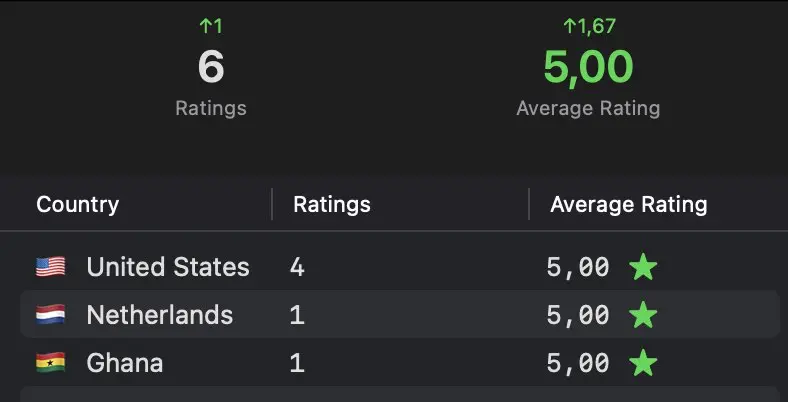
Ratings overview from my App Store ratings guide
This is (almost) all there is to ASO. It's really not that complicated imo, especially with the tools we have nowadays.
If you've made it this far, thank you! Hopefully you found this valuable and learned something new! If you did, and want to support me:
- Repost this article or save it
- Try out Astro through my affiliate link.
- Feed this entire post into your AI and start building! :)